FAQ - Frequently Asked Questions and Answers
Privacy
When will my images be deleted?
We place great importance on data privacy. That’s why your images and related data are automatically removed from our system after a certain period of time. You can also delete your data manually. You can find more information and options for deleting your data on our Privacy page.
Create Online
What makes Rapid-Mosaic different from other mosaic providers?
Many mosaic providers do not create true photo mosaics and instead simply tint the images.
Rapid-Mosaic
on the other hand offers several different mosaic types.
You can find the full comparison here: Why Rapid-Mosaic? –
Comparison with other mosaic providers
The Main Image
What should I keep in mind for the main image?
Choose a subject with few details: The simpler and more high-contrast the image, the better the result – small details don’t show up well in a mosaic. The image should be at least 1000×1000 pixels. The format doesn’t matter, since you can crop it in the next step.


1. High Contrast
Light and dark areas should be clearly separated. This creates a mosaic with stronger contrast and more visible detail.


2. Large Main Subject
Your subject should take up as much of the image as possible. Avoid very small people or objects in the distance.

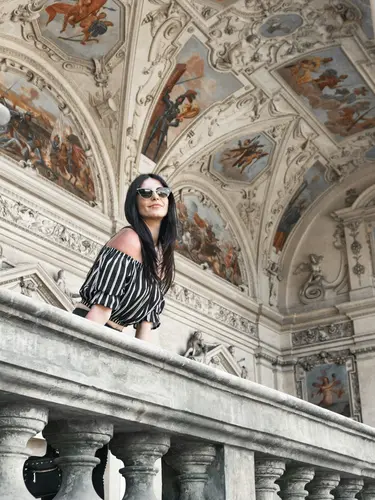
3. Clean Background
A clean background keeps the focus on the main subject and helps create a more balanced mosaic.


4. Good Lighting
Natural daylight or even lighting helps produce clear colors and better results.
Which subjects work best?
There are no limits to your creativity: Portraits, animals, and landscapes work just as well as logos, symbols, numbers, or lettering. The most important thing is a clear, high-contrast subject.
Can I try multiple main images?
Absolutely! You can remove the main image at any time and upload a different one. Even after the mosaic has finished processing, you can simply start over and try a different subject.
Print Format & Size
Why do I need to choose the size in advance?
The mosaic is calculated to fit your selected format exactly: the number and arrangement of the tiles are optimized for that size and aspect ratio. That’s why you choose the format before the mosaic image is created.
When can I choose poster, canvas, and other materials?
You choose the material only after your mosaic image has been calculated. As soon as you receive the preview by email, you can select your preferred material during the ordering process – for example poster, canvas, acrylic, or Dibond.
Can I change the size later?
Yes. Simply start a new mosaic calculation with the desired format and request a new preview. An existing mosaic can’t simply be resized, since it is always calculated for a specific format.
The Tile Images
How many individual photos do I need?
You should have at least 50—the more, the better. There is no upper limit, so you can also use well over 1,000 photos.
Do I need to edit the individual photos beforehand?
No. The photos are automatically compressed before upload, and the algorithm crops them to the appropriate format on its own when creating the mosaic.
Are all photos used?
We try to use every photo. Depending on the characteristics of the photos or the selected mosaic type (e.g. Classic, Parquet), this is not always completely possible. You can see which photos were used afterward in the preview.
How large will the individual photos be later?
Depending on the format, about 1–3 cm. After the calculation, you can choose between different tile sizes and compare them directly.
What happens to my photos afterward?
Data privacy is important to us: If no order is placed, your photos will be automatically deleted again after a certain period.
Preview & Next Steps
When will I receive the mosaic preview?
Depending on server load and the number of photos, creating your mosaic takes about 15 minutes to 2 hours. We’ll then send you the preview by email. If you don’t receive anything, please also check your spam folder.
Is the preview really free?
Yes. Creating and sending the mosaic preview is free and without obligation. You only incur costs if you actually place an order.
What will my email address be used for?
Only to send you the preview and the link for selecting and ordering. If no order is placed, your data and photos will be automatically deleted again after a certain period.
What happens after the preview?
Using the link in the email, you can choose between different mosaic versions and tile sizes and order your preferred design directly.
Software
How can I save the finished mosaic image to my hard drive without having it printed?
In the free version of Rapid-Mosaic, the generated mosaic images can only be uploaded to
www.rapidmosaic.com
and ordered as a poster/canvas/etc. If you would still like to save your images so that
you
can have them printed by your local print shop or continue editing them,
you can purchase the Professional version of Rapid-Mosaic. This version allows you to save the
mosaic images
as JPG files. The
Professional version is included in the Professional package from Foto-Mosaik-Edda and is
available here:
Buy Rapid-Mosaic Professional
Is the software “Foto-Mosaik-Edda” still available?
Rapid-Mosaic is our new free software that allows you to easily create photo mosaics for wall decor
and order them online right away. It is based on the libraries of Foto-Mosaik-Edda,
but is much easier to use. With the free version of Rapid-Mosaic, you can only
order images
online, which is sufficient for most users. Only the Professional version also allows you to save the
mosaic images.
When installing Foto-Mosaik-Edda in German, Rapid-Mosaic is automatically installed and
launched. If you would still like to use the "old" Foto-Mosaik-Edda software, you can
still find the program in the installation folder, and it can still be launched and used.
How do I install the Professional version?
After purchasing the software, you will receive an email with the download link and a license file attached.
- Download the installer using the link from the license email, start the installation, and install the software on your computer. If you still have the standard version installed, uninstall it first to avoid conflicts.
- To activate the Professional version, copy the file "license.lic" attached to the email to your hard drive. This file contains your license for Rapid-Mosaic Professional.
- Then start the installed Rapid-Mosaic Professional. The following message will appear: "License file '[...]' does not exist.".
- Confirm the message and a dialog will open: "Open License File...".
- In the dialog, open the "license.lic" file that you copied to your hard drive.
You can now use Rapid-Mosaic Professional.
Were all of my images in the folder used?
Rapid-Mosaic generally tries to use all images in the folder at least once. However, there are two reasons why an image in the folder may not be used:
- If the image on the hard drive could not be read properly, for example because it was not fully transferred from the camera.
- If an image in the folder has a different format than the images in the mosaic image. For example, a portrait image will not be used if landscape images are used in the Classic/Detail mosaic. This is intended to prevent heads or other important parts of the image from being cropped.
The software’s debug output shown during calculation provides information about how the
image collection is structured. For example:
... Database: Reading Database done. 1630 items read. Time: 128 ms.

                    ... Database: Count (1630): landscape (959), portrait (668), square (3).
                    ...
In this example, 1,630 images were found. Of these, 959 are landscape, 668 are portrait, and 3 are
square.
In this example, the Classic and Detail mosaic will use landscape format. The
Parquet mosaic uses both landscape and portrait images. The Chaos mosaic uses all images,
but some may be partially hidden because they are underneath others.
In the online version of Rapid-Mosaic, there is currently no way to check whether all images were used.
How can I set custom print sizes in Rapid-Mosaic or Foto-Mosaik-Edda?
The print sizes are stored in the file "C:\Users\<USER>\Documents\Rapid-Mosaic\PrintSizes.xml" or "C:\Users\<USER>\Documents\Foto-Mosaik-Edda\PrintSizes.xml". By editing the file with a text editor, you can add or change print sizes. Please note that only the formats listed in the price list can be used for online orders.
The image upload does not work. The following message appears: “The request was aborted”
Due to an update of the SSL protocol on the server, Foto-Mosaik-Edda and
Rapid-Mosaic must be updated to the latest version 7.7.20050.1 from 02/19/2020.
Otherwise, uploading the finished mosaic will unfortunately no longer work
and will fail with the error message: "The request was aborted:
Could not create SSL/TLS secure channel".
Please
download the latest version of the software to resolve this issue.
By using the latest SSL protocol, your data is optimally
protected.
Ordering
Can you make changes or improvements to the uploaded image afterward?
The mosaic image is produced exactly as you see it in the Rapid-Mosaic preview. We do not make any changes afterward (black and white, blending, cropping). Please also note the print preview in Rapid-Mosaic. The way the tile size is displayed there is exactly how it will appear on the final product.
Only one size is shown for your uploaded image on the order page. How can you select a different size?
The dimensions of the mosaic image must be defined in the Rapid-Mosaic program before the calculation. Based on the selected print size, Rapid-Mosaic calculates the ideal mosaic image. This is the only way to ensure that the mosaic image resolution, tile size, and print preview are set correctly. After uploading the mosaic image from the Rapid-Mosaic software, only the selected print size will then be available in the order options.
Delivery
How long does delivery take for a mosaic image?
|
TODAY
|
Sun
06. September
|
|
Mon
07. September
|
|
|
Tue
08. September
|
|
|
Wed
09. September
|
|
|
Thu
10. September
|
|
|
STANDARD
Delivery between Fri 11. Sep. and Thu 17. Sep.
|
Fri
11. September
|
|
Sat
12. September
|
|
|
Sun
13. September
|
|
|
Mon
14. September
|
|
|
Tue
15. September
|
|
|
Wed
16. September
|
|
|
Thu
17. September
|
|
TODAY
|
|
|
|
|
STANDARD
Delivery between Fri 11. Sep. and Thu 17. Sep.
|
||||||
|
Su
06
Sep.
|
Mo
07
Sep.
|
Tu
08
Sep.
|
We
09
Sep.
|
Th
10
Sep.
|
Fr
11
Sep.
|
Sa
12
Sep.
|
Su
13
Sep.
|
Mo
14
Sep.
|
Tu
15
Sep.
|
We
16
Sep.
|
Th
17
Sep.
|
Fast & convenient
If you need it quickly, just order the Download Version. The high-resolution download will arrive via email in about 5 minutes.Shipping method: Standard
We aim to use our resources as efficiently and eco-friendly as possible, so it takes up to three business days to produce your picture. After that, the picture will be shipped via standard delivery the next day. The shipping time by the delivery service usually takes between one to five business days (for bulky goods, such as large canvas/acrylic/Dibond formats).
Which countries do you ship to?
We currently ship to the following countries:
Germany
,
Austria
,
Switzerland
,
Spain
,
France
,
Italy
,
Netherlands
,
Belgium
,
Luxembourg
,
United States,
Great Britain
,
Canada
,
Australia
You will usually be redirected automatically to the appropriate country version of our shop. Alternatively,
you can manually select your country in the footer of the page using the flag at the bottom right.
You can find more information about prices and shipping costs on the respective country page under: Price and Size Overview
If you do not want to have your image printed directly by us, you have two alternatives:
- You can purchase the finished image as a high-resolution JPG file directly in the shop and download it.
- Or you can choose the Professional version of Rapid-Mosaic, which allows you to create and export your mosaic locally on your PC.
Any other questions?
Didn’t find your question here? Simply send us your question using our contact form .
Customer Reviews
The result is exactly as shown on the website and I am very satisfied. The different steps are clearly explained on the site. After my order, I quickly received a response with the invoice and then a track-and-trace code.
The delivery time is also exactly as indicated. I am very satisfied and will certainly not hesitate to place another order.
TOP!!!
![Customer Photo by Chantal for Review Print Photo Mosaic [Online] Poster 100x50cm](/image/500/rating-customer-photo-chantal-2026-08-15-6340731.jpg)
![Customer Photo by Hannah for Review Photo Mosaic [Online] as download](/image/500/rating-customer-photo-hannah-2026-08-19-6375320.jpg)
Did You Know?
Our passion is photos and personalized print products. Check out our other creative gift ideas: